SAPS Ibu Bapa ialah Sistem Analisis Peperiksaan Sekolah yang diperkenalkan oleh Kementerian Pendidikan Malaysia (KPM). Melalui sistem ini, ibu bapa boleh membuat SAPS semakan ibu bapa dan menyemak keputusan peperiksaan anak-anak secara online dengan mudah. Akses ke portal SAPS Ibu Bapa Login membolehkan anda melakukan semakan SAPS untuk memantau prestasi murid di sekolah rendah dan menengah. Dengan adanya SAPS ibubapa, semua maklumat peperiksaan kini boleh diakses secara atas talian tanpa perlu ke sekolah.

Apa itu uFuture? (maksud)
SAPS mostly use in some other digital learning recourses as (Peperiksaan Percubaan SPM), Also fully serving as (School Improvement Toolkit).
Login mudah ke sistem KPM melalui IDME – akses SAPS, APDM, eOperasi & lebih dengan satu akaun berpusat yang selamat dan efisien.

SAPS Ibu Bapa permits parents to take care or monitor their child’s academic as offers (driven school improvement, parental involvement).
working mechanism contains (Students sit for school-level exams), Teacher Enters Marks, System Processes Data and more.
saps ibu bapa login
- Visit official link (https://saps.moe.gov.my/ibubapa2/)
- Press on (Semakan Ibu Bapa).
- Provide (MyKad) without dash of student.
- Then hit the icon (Cari).
- After Login, Select (Negeri) and (Sekolah) of registered child.
- Finally click on Semak button.
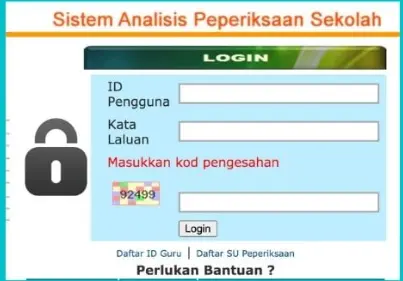
Sometime Parents face bugs as (unable to access SAPS Ibu Bapa Login), using their child’s verification number, Parents can get help from child’s Teacher (GK) to report this bug.
Guru Kelas (GK) must check student’s IC number, by usage MyKad or birth certificate. In case its incorrect, GK should update record’s in APDM KPM portal and must navigate this error to online APDM supports.
SUP also needed to update the student’s IC number in the SAPS system. Also check contoh peribahasa dan maksud.
Semak Keputusan Peperiksaan Ibu Bapa SAPS
Parents just required (student’s identification card number), Next choosing (primary or secondary school) then click on check button.
Gred Sekolah Rendah
- 80-100 Gred A (Cemerlang)
- 65-79 Gred B Baik
- 50-64 Gred C Memuaskan
- 40-49 Gred D Mencapai Tahap Minimum
- 0-39 Gred E Belum Mencapai Tahap Minimum
- TH Tidak Hadir
Gred Sekolah Menengah
- 85-100 Gred A Cemerlang
- 70-84 Gred B Kepujian
- 60-69: Gred C Sederhana
- 50-59: Gred D Boleh Diterima
- 40-49: Gred E Hampir Lulus
- 0-39: Gred F Di Bawah Keperluan Minimum
- TH: Tidak Tersedia
Gred Menengah Atas
- 90-100: Gred A+ Cemerlang Terunggul
- 80-89: Gred A Prestasi Cemerlang
- 70-79: Gred A- Kualiti Tinggi
- 65-69: Gred B+ Kepujian Cemerlang
- 60-64: Gred B Kepujian
- 55-59: Gred C+ Merit Tinggi
- 50-54: Gred C Pujian
- 45-49: Gred D Boleh Lulus
- 40-44: Gred E Baru Lulus
- 0-39: Gred G Gagal
- TH Tidak Hadir
1: Visit this URL (www.sapsnkra.moe.gov.my), Login with ID. 2: Choose (PARENTAL REVIEW) option. 3: Provide (student ID card number), 4: (Secondary School and Examination Year), 5: click on (CHECK REPORT), 6: Finally select Exam Result’s type.
Semak Keputusan & Jenis Peperiksaan
Using SAPS portal multiple result’s types can be checked as Urus data murid pendidikan khas dengan SMPK KPM – sistem rasmi KPM untuk MBPK di sekolah rendah & menengah.
- Keputusan Sekolah Menengah: (Tingkatan 1 – 5)
- Keputusan Sekolah Rendah: (Darjah 1 – 6).
Support Hotline
Parents also need to check and verify (Examination result release date) to ensure that student’s details are correct.
If any technical issue or Complaints comes on front as Parents can Educational Technology Division (BTP) at 03-8321 7000 or email [email protected].
To provide your guarantee feedback must contact at (MOE Call Centre at 1800-88-7723), also visit Kemaskini idme moe gov my login (murid, cara ibu bapa) 2025.